How to Export Business Leads to CSV (Complete Guide 2026)
Finding business leads is only the first step in building a successful sales pipeline. This guide shows how to search, filter, and export structured business lead data into CSV with LeadBoba.
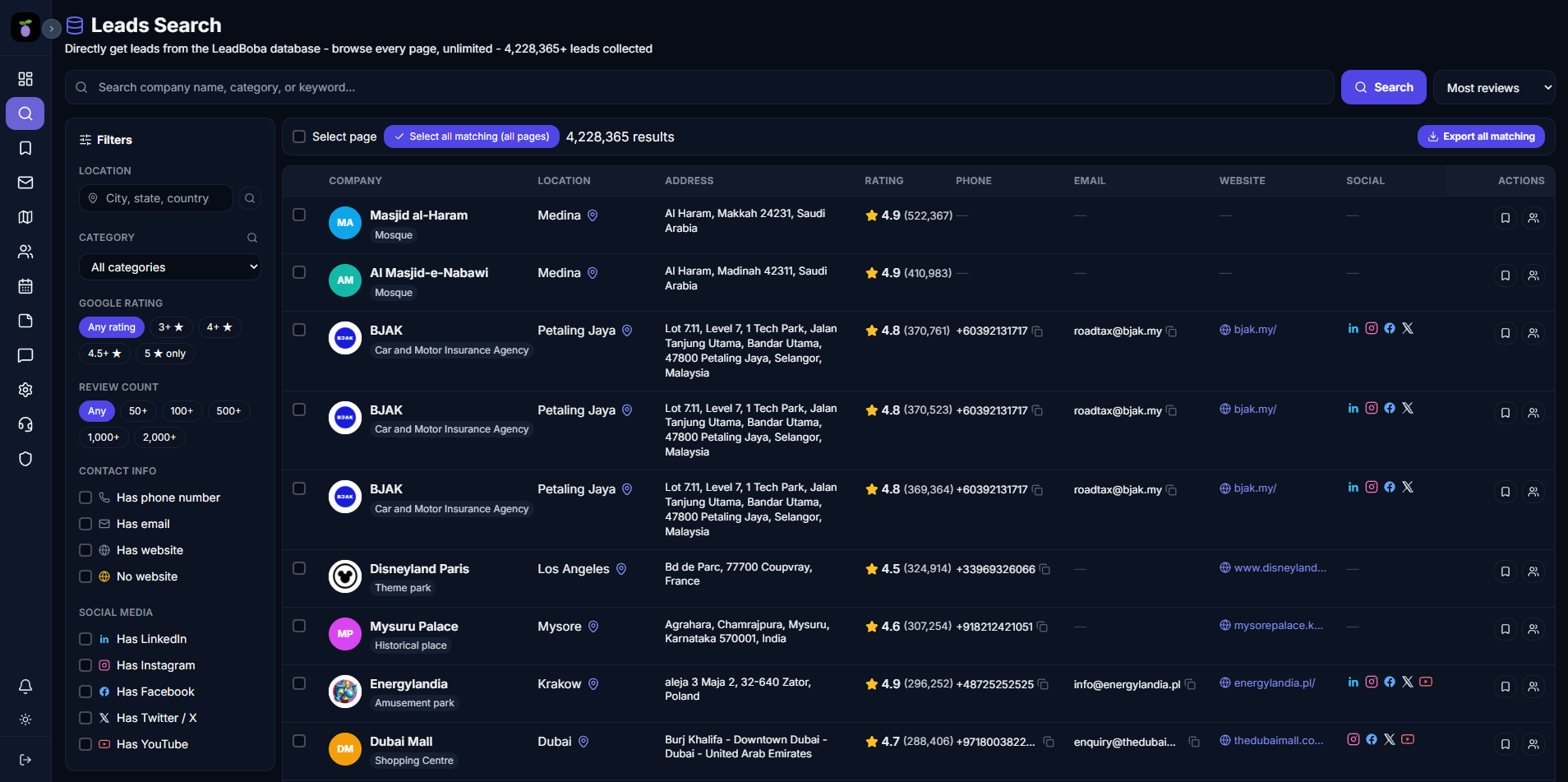
LeadBoba's workspace for searching, filtering, and exporting business leads
Finding business leads is only the first step in building a successful sales pipeline.
After discovering potential customers, sales teams, agencies, and businesses need a simple way to organize, analyze, and use their lead data. This is where CSV export becomes essential.
A CSV file allows businesses to save, manage, filter, and import lead data into existing sales tools, CRM platforms, spreadsheets, and outreach systems.
LeadBoba helps businesses discover companies worldwide and export detailed business lead data into CSV files with just a few clicks. Whether you need local business leads, B2B prospects, or industry-specific company lists, LeadBoba makes it simple to find and export structured business information.
What Is CSV Export for Business Leads?
CSV export allows users to download collected lead information into a spreadsheet-compatible file. Instead of manually copying business information one by one, users can export hundreds of organized data points and use them for:
- Sales prospecting
- Cold email campaigns
- CRM imports
- Market research
- Business analysis
- Lead management
A business lead CSV file can include important information such as:
- Company name
- Business category
- Address
- Phone number
- Email address
- Website
- Social media profiles
- Google rating
- Review count
- Google Maps URL
How to Export Business Leads with LeadBoba
Exporting business leads with LeadBoba is designed to be simple. Users only need to enter two things:
- Business category — e.g. "Dentist"
- Location — e.g. "Leeds, London"
After entering the search criteria, LeadBoba automatically discovers relevant businesses and displays lead information. No complicated setup is required.
Search for Any Business Category
LeadBoba allows users to search for businesses across different industries, including:
- Dentists
- Restaurants
- Plumbers
- Roofers
- Accountants
- Real estate agencies
- Marketing agencies
- Hotels
- Contractors
You can search for businesses in almost any location around the world — for example, "restaurants in New York," "roofers in Manchester," "dentists in London," or "marketing agencies in Sydney."
Choose Your Target Location
LeadBoba supports location-based business searches. Users can find businesses by:
- Country
- City
- Region
- Local area
This makes it useful for:
- Local marketing agencies
- Sales teams
- Freelancers
- SaaS companies
- B2B businesses
Filter Business Leads
LeadBoba includes filtering options to help users find more relevant prospects. Instead of collecting random businesses, users can narrow results based on specific requirements.
Google Rating Filter
Find businesses based on reputation:
- 4+ star businesses
- 4.5+ star businesses
- 5-star businesses
Social Media Availability Filter
Find businesses that have an online presence. Filter businesses by:
- Instagram availability
- Facebook availability
- LinkedIn availability
- YouTube availability
Contact Information Filter
Find businesses with available contact details. Filter by:
- Email availability
- Phone number availability
- Website availability
These filters help sales teams focus on higher-quality prospects.
Export Leads as CSV
Once you find your ideal prospects, simply click the CSV export button. LeadBoba exports structured business data that can be used immediately.
| # | Company Name | Category | Address | Phone | Website | Rating | Reviews | |
|---|---|---|---|---|---|---|---|---|
| 1 | Example Business | Dentist | London, UK | Phone number | Website | 4.8 | 350 | |
| 2 | Example Company | Dental Clinic | Leeds, UK | Phone number | Website | 4.6 | 220 |
Simplified preview of a LeadBoba CSV export — full exports also include social profiles and Google Maps URL
What Information Does LeadBoba Export?
LeadBoba provides detailed business information including:
Company Information
Company name, business category, and address.
Contact Information
Phone number, email address, and website.
Social Media Profiles
Instagram, Facebook, Twitter/X, LinkedIn, and YouTube.
Reputation Data
Google rating and review count.
Location Data
Google Maps URL.
This creates a complete business prospecting dataset.
Why Export Business Leads to CSV?
CSV exports make lead data flexible and easy to use.
Import Into CRM Systems
Sales teams can upload exported leads into CRM platforms such as HubSpot, Salesforce, Zoho CRM, or Pipedrive.
Create Cold Email Campaigns
Marketing teams can use exported lead lists for personalized outreach campaigns, combined with email automation tools, AI email generation, or sales sequences.
Analyze Business Markets
CSV files allow businesses to analyze industry trends, local markets, competitor locations, and business opportunities.
Who Uses Business Lead CSV Export?
Find potential clients by industry and location — for example, a digital marketing agency can find "restaurants in London" and create targeted outreach campaigns.
Build prospect lists and improve outbound sales processes.
Find businesses that may need website design, SEO services, marketing services, or consulting.
Discover companies that match their ideal customer profile.
LeadBoba vs Manual Business Data Collection
Manual research requires:
- Searching Google Maps
- Opening websites
- Copying information
- Creating spreadsheets
- Checking social profiles
This process is slow and difficult to scale. LeadBoba automates business discovery and creates structured lead exports.
Find Business Leads Anywhere in the World
LeadBoba is designed for global business prospecting. Users can discover businesses across different countries and markets, whether you want to find:
- UK businesses
- US companies
- Australian businesses
- European prospects
- Local businesses in any city
LeadBoba helps you build targeted business lead lists.
Start Exporting Business Leads with LeadBoba
Building a business lead database does not need to be complicated. With LeadBoba, users can search for any business category, select a location, filter relevant prospects, and export detailed business information into CSV.
Find businesses faster, organize your prospects, and create better sales opportunities with LeadBoba.
Start building your business lead database today
Search any business category and location, filter by rating, contact data, and social presence, then export structured leads to CSV — all in one platform.
Leads Generator
Target businesses you won't find on LinkedInExtract leads from Google Maps, Apple Maps and Bing Maps
Restaurant in your area