LeadBoba vs FindThatLead
Which Platform Is Better for B2B Lead Generation and Sales Outreach in 2026?
Finding new customers requires more than collecting email addresses. FindThatLead and LeadBoba both help businesses with prospecting, but they focus on different approaches — an email prospecting tool vs. a complete business lead generation workflow. Here's an unbiased, use-case-based breakdown to help you decide.
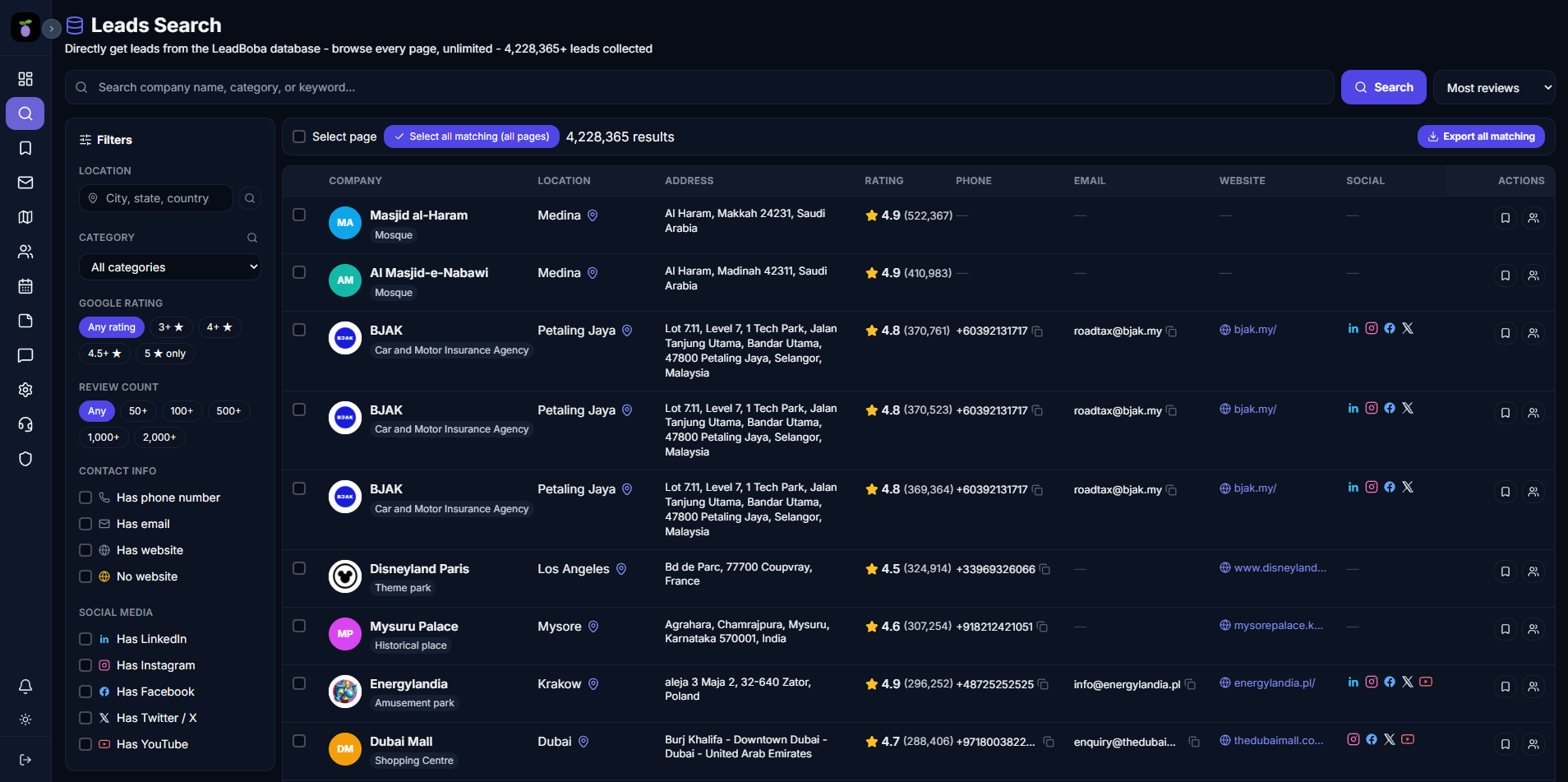
LeadBoba's all-in-one workspace compared with a FindThatLead prospect list
Finding new customers requires more than collecting email addresses.
Modern sales teams need a complete process:
- 1. Discover potential companies
- 2. Find accurate contact information
- 3. Understand business opportunities
- 4. Organize prospects
- 5. Create personalized outreach
- 6. Track sales conversations
FindThatLead and LeadBoba both help businesses with prospecting, but they focus on different approaches.
FindThatLead is a sales prospecting platform focused on finding professional email addresses, generating prospect lists, and helping users start outreach campaigns.
LeadBoba is a B2B lead generation platform focused on discovering businesses through Google Maps and websites, collecting company information, managing leads through CRM tools, generating AI-powered emails, and supporting complete sales workflows.
The key difference:
FindThatLead helps users find contacts.
LeadBoba helps businesses discover companies, manage leads, and convert prospects into opportunities.
What Is FindThatLead?
FindThatLead is a B2B prospecting platform designed to help users find professional contact information. Its main features include:
- Email finder
- Email verification
- Domain search
- Prospect search
- Contact list building
- Lead generation tools
- Outreach support
FindThatLead is commonly used by:
- Sales representatives
- Growth marketers
- Agencies
- Freelancers
- Recruiters
who need contact information for outbound campaigns.
What Is LeadBoba?
LeadBoba is a B2B lead generation and sales workflow platform designed to help businesses discover, organize, and contact potential customers. LeadBoba allows users to:
- Search businesses through Google Maps
- Discover companies by industry and location
- Crawl business websites
- Extract emails and phone numbers
- Collect social media profiles
- Save leads
- Manage CRM pipelines
- Add notes to prospects
- Generate AI-powered cold emails
- Improve grammar and writing quality using AI
- Send emails through Gmail integration
- Track outreach activity
- Analyze lead performance
LeadBoba combines business discovery, CRM management, and AI-assisted outreach into one platform.
Prospecting Tool vs. Complete Lead Generation Workflow
The biggest difference between FindThatLead and LeadBoba is where the sales process starts.
FindThatLead focuses on contact discovery. Typical workflow:
- 1. Search for a person or company
- 2. Find email address
- 3. Verify contact information
- 4. Export prospects
- 5. Use outreach tools
LeadBoba focuses on finding business opportunities. Typical workflow:
- 1. Search an industry and location
- 2. Discover businesses
- 3. Collect company information
- 4. Save leads
- 5. Manage pipeline
- 6. Generate AI emails
- 7. Contact prospects
Finding Contacts vs. Finding Businesses
FindThatLead is designed for users who already know their target audience. Examples:
- Find emails of company employees
- Build contact lists
- Verify professional addresses
LeadBoba helps users discover businesses before choosing contacts. Examples:
- Find plumbers in London
- Find restaurants in Manchester
- Find dentists in Birmingham
- Find agencies worldwide
LeadBoba allows users to start with a market and discover opportunities.
Google Maps Business Discovery
One of LeadBoba's biggest differences is Google Maps-based lead generation. Users can search businesses by:
- Industry
- Location
- Business category
LeadBoba collects:
- Business name
- Address
- Phone number
- Website
- Google rating
- Reviews
- Social media links
This is useful for:
- Local marketing agencies
- Freelancers
- Consultants
- Service providers
FindThatLead focuses mainly on contact discovery rather than location-based business discovery.
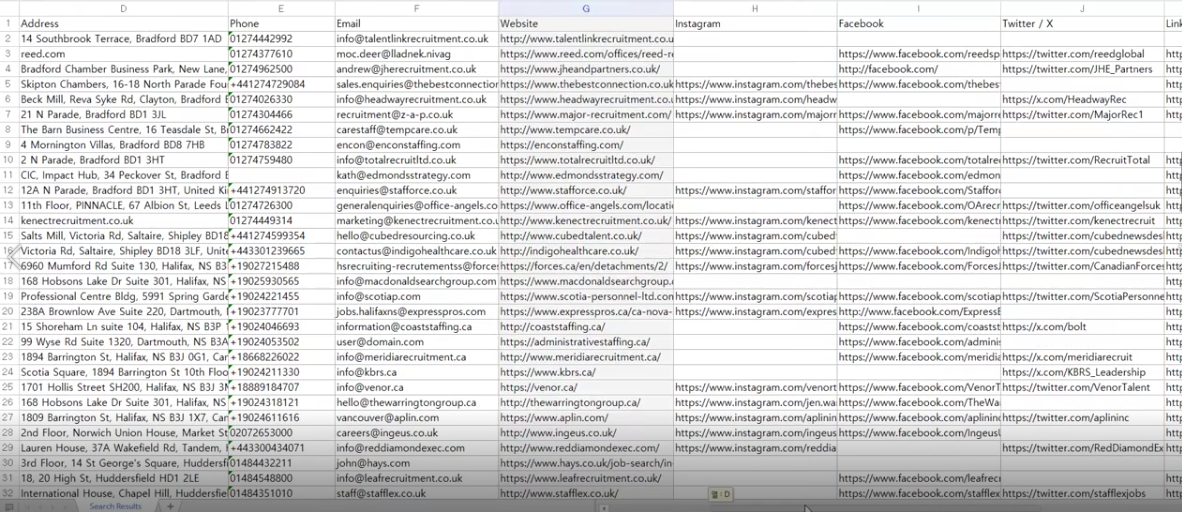
A screenshot of a location-based search (e.g. "plumbers in London") fits well here
Data Quality and Business Information
FindThatLead focuses on finding contact details. Users can access:
- Professional emails
- Contact information
- Prospect details
LeadBoba provides broader business context. Users can understand:
- Company information
- Website presence
- Online reputation
- Social media activity
- Business location
This allows businesses to decide which prospects are worth contacting.
Website Analysis and Opportunity Discovery
LeadBoba uses website information as part of the lead generation process. This helps identify potential sales opportunities. Examples:
- A web agency can discover businesses with outdated websites.
- A marketing company can find companies with poor online visibility.
- A consultant can identify businesses matching specific criteria.
FindThatLead focuses on finding contacts rather than analyzing business opportunities.
CRM and Lead Management
LeadBoba includes built-in CRM functionality. Users can:
- Save leads
- Create sales pipelines
- Add notes
- Track lead status
- Organize prospects
- Review previous searches
FindThatLead focuses mainly on prospect discovery and contact information. Users may need additional CRM software to manage leads after finding contacts.
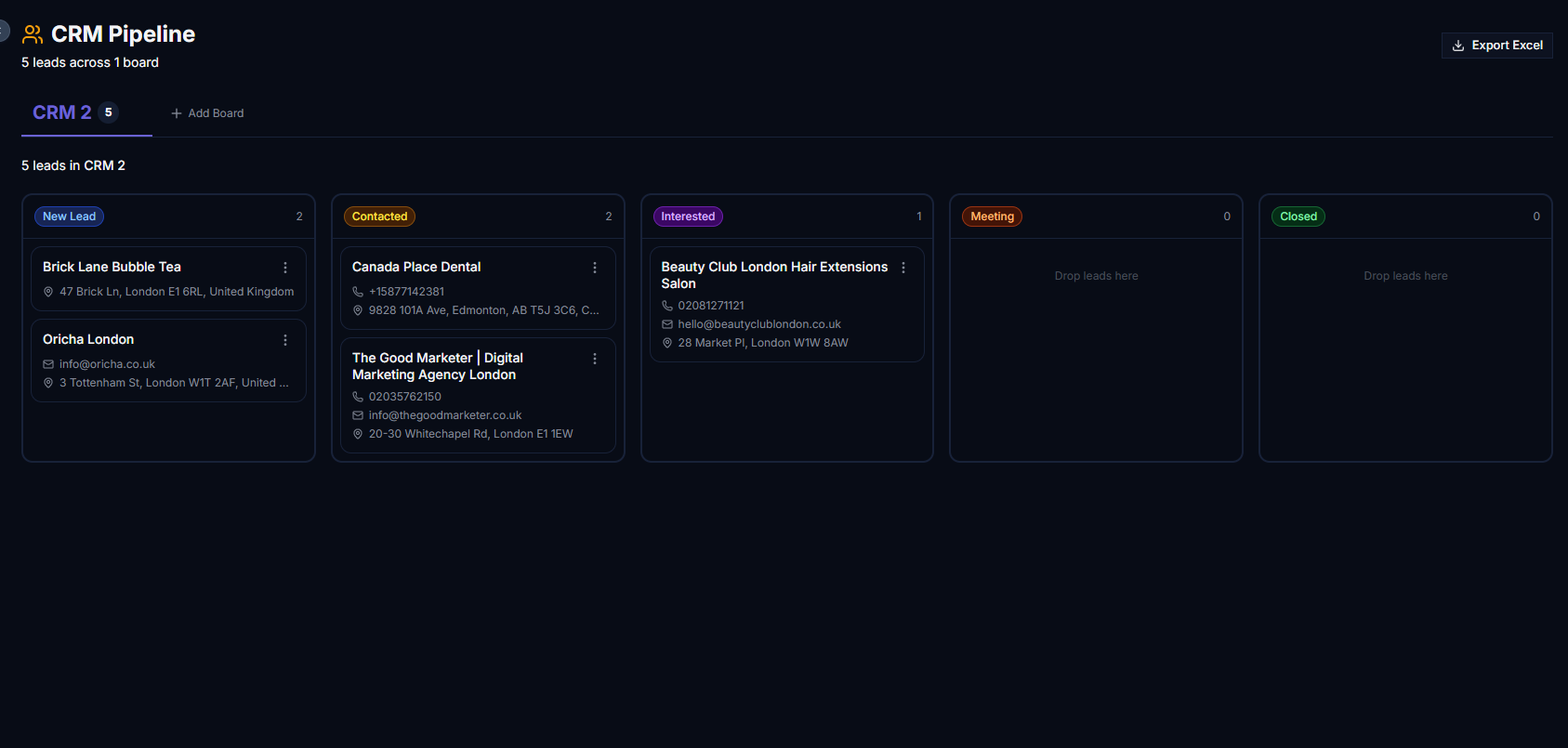
A screenshot of the CRM pipeline/kanban board fits well here
AI-Powered Outreach
LeadBoba includes AI sales writing features. Users can:
- Generate cold emails
- Personalize messages
- Fix grammar
- Improve sentence structure
- Adjust communication tone
This helps businesses quickly move from discovery to outreach.
FindThatLead supports prospecting workflows but focuses more on finding contacts than AI-assisted sales communication.
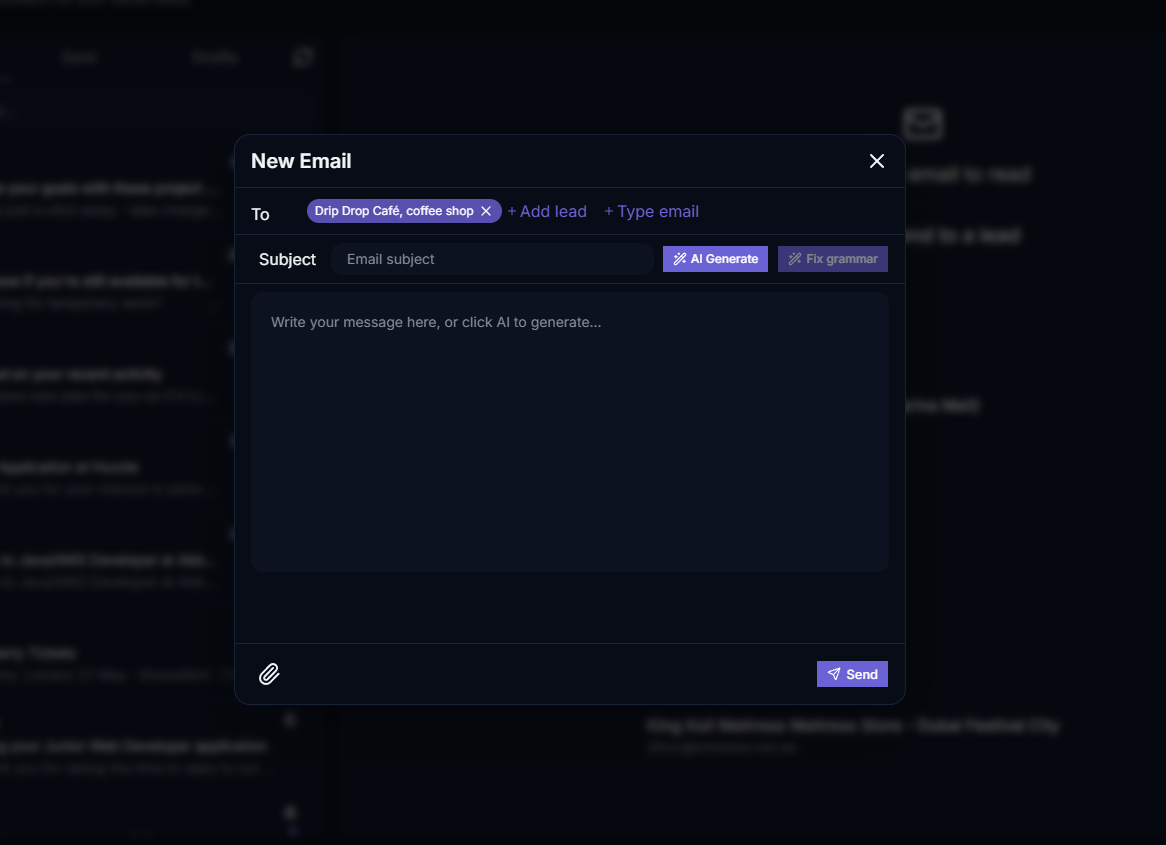
A screenshot of the AI writing assistant fits well here
Gmail Integration and Communication Workflow
LeadBoba connects Gmail directly with the sales process. Users can:
- Connect Gmail accounts
- Send emails from LeadBoba
- Attach files
- Keep communication history linked to leads
This creates a complete workflow: Find business → Organize lead → Write email → Contact prospect
FindThatLead typically requires users to connect discovered contacts with separate outreach systems.
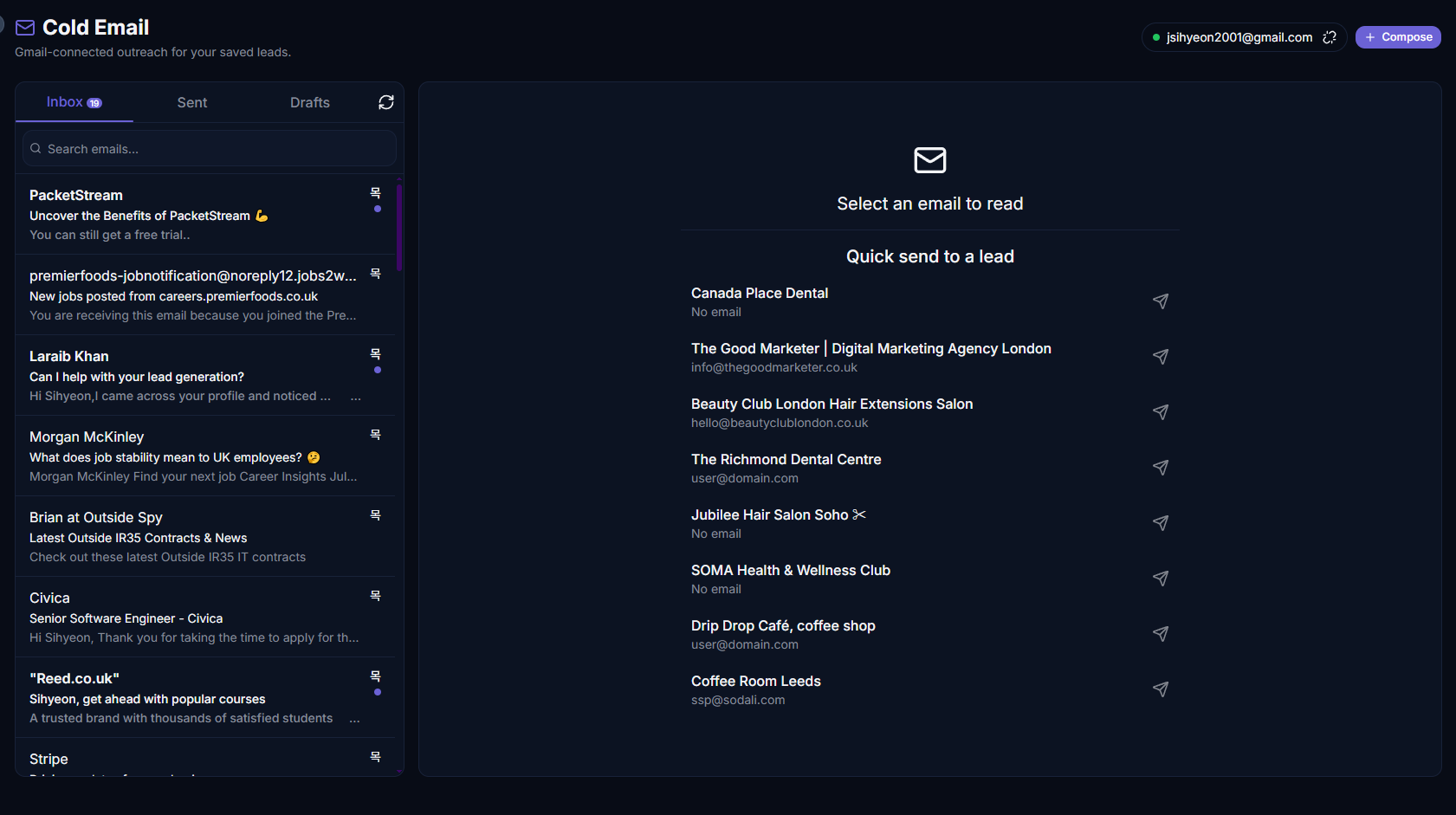
A screenshot of the Gmail composer / cold email tool fits well here
Analytics and Lead Visualization
LeadBoba provides sales-focused analytics. Users can monitor:
- Search activity
- Saved leads
- Lead scores
- Outreach performance
- Sales activity
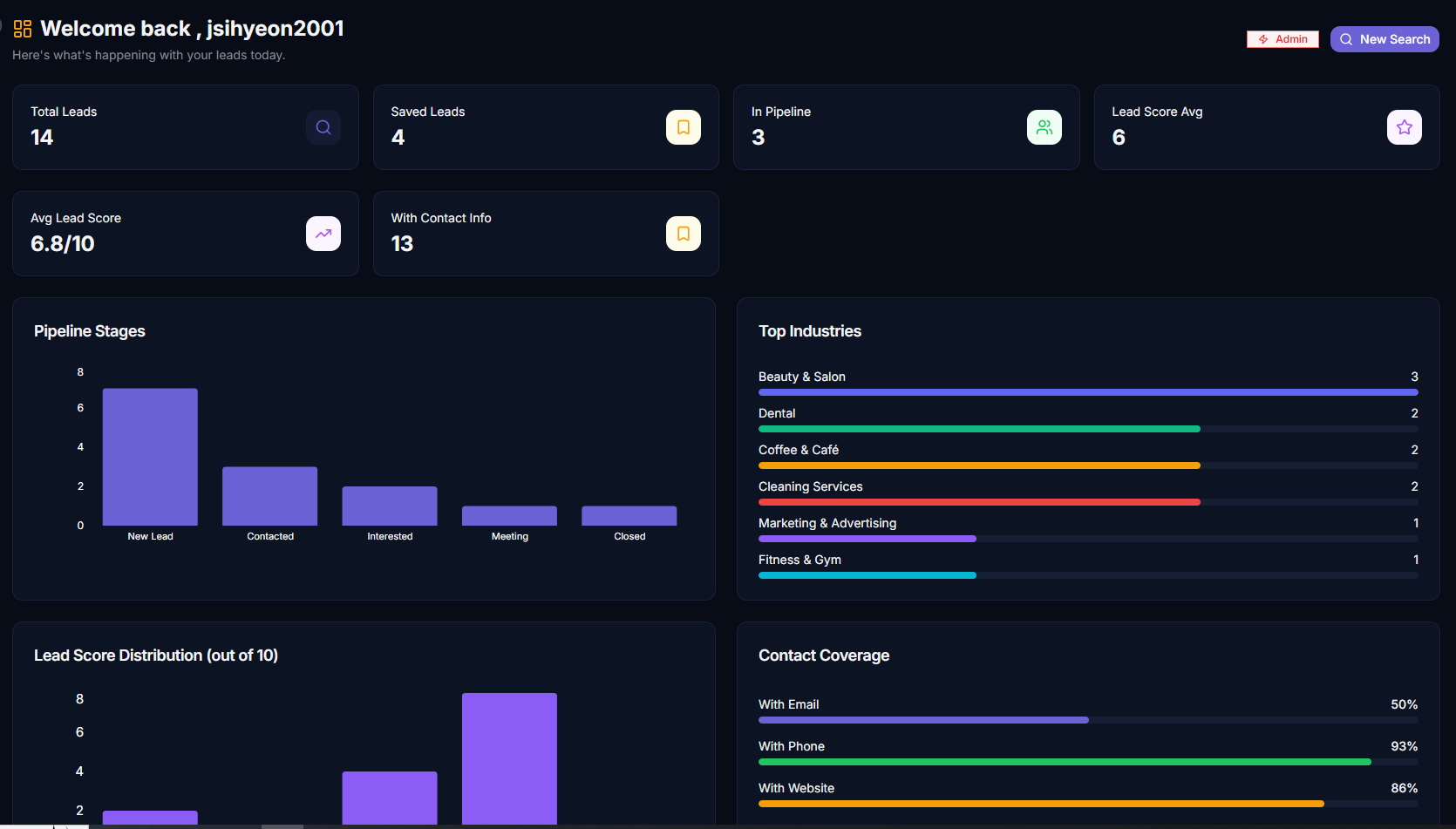
A screenshot of the analytics dashboard fits well here
LeadBoba also includes a global map visualization showing saved leads by location. This helps businesses understand:
- Target markets
- Geographic opportunities
- Expansion areas
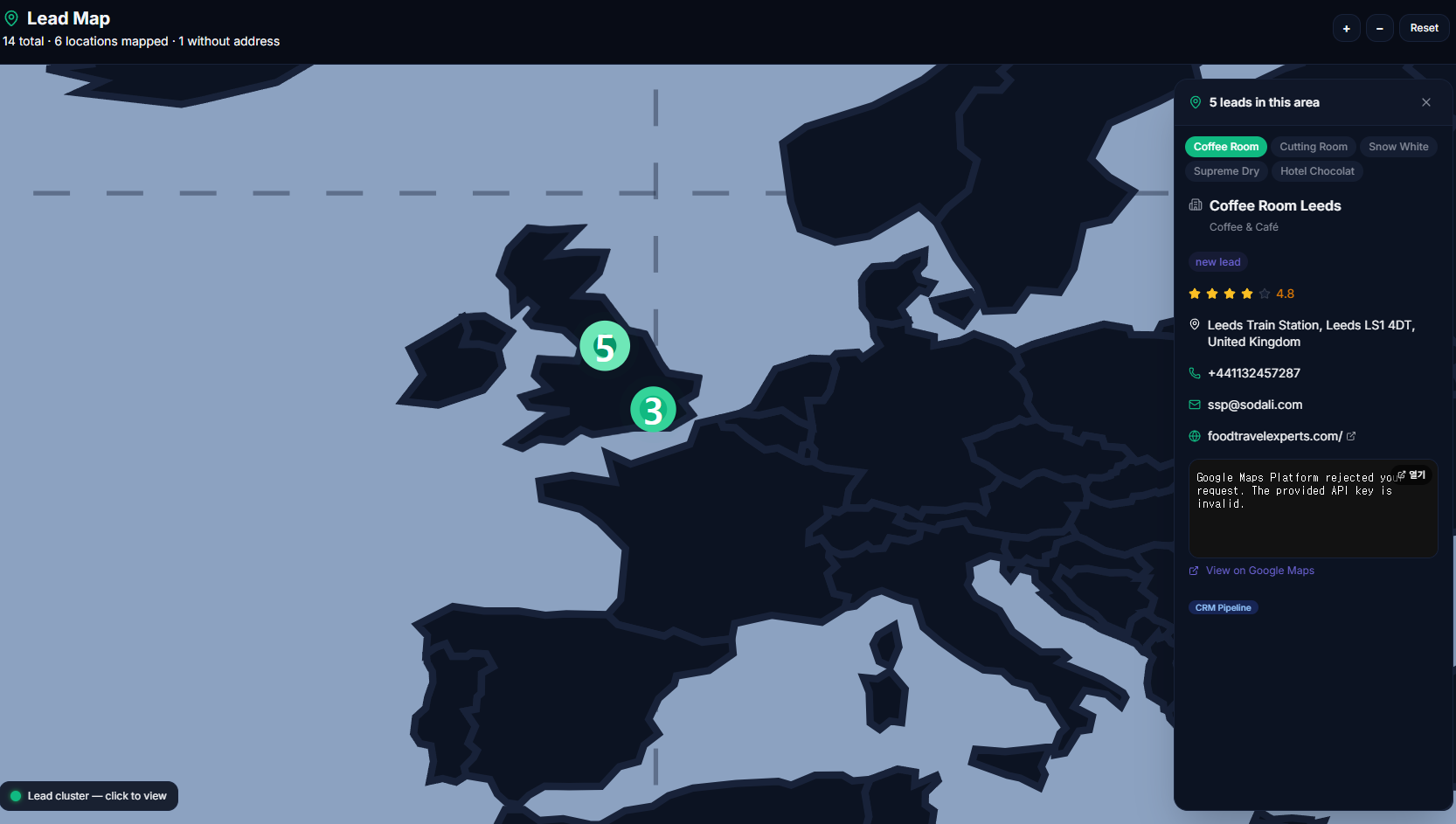
A screenshot of the leads map page fits well here
Ideal Users
FindThatLead may be suitable for:
- Sales professionals
- Growth marketers
- Recruiters
- Freelancers
Especially users who need:
- Email discovery
- Contact verification
- Prospect lists
LeadBoba may be suitable for:
- Startups
- Agencies
- Freelancers
- Consultants
- Local businesses
- SMB sales teams
Especially users who need:
- Business discovery
- CRM management
- AI outreach
- Complete lead workflow
inside one platform.
LeadBoba vs FindThatLead: Feature Comparison Table
A side-by-side summary of the core features covered above.
| Feature | LeadBoba | FindThatLead |
|---|---|---|
| Business discovery | limited | |
| Google Maps search | ||
| Company data extraction | limited | |
| Email finding | ||
| Email verification | limited | |
| Phone extraction | limited | |
| Website crawling | limited | |
| Social media discovery | limited | |
| CRM pipeline | ||
| Lead notes | ||
| AI email generation | limited | |
| AI writing improvement | ||
| Gmail integration | limited | |
| Lead scoring | ||
| Sales dashboard | limited | |
| Lead map visualization |
Frequently Asked Questions
So, Which One Should You Choose?
FindThatLead and LeadBoba are designed for different prospecting strategies.
FindThatLead is a focused prospecting platform that helps users find professional contact information.
LeadBoba provides a complete B2B lead generation workflow:
- Discover businesses
- Collect company information
- Find contact details
- Organize prospects
- Generate AI-powered emails
- Contact customers
- Manage relationships
- Analyze sales activity
For users who mainly need email discovery, FindThatLead can be a useful solution.
For businesses that want to discover new opportunities and manage the complete sales process from finding prospects to outreach, LeadBoba provides a broader platform.
Try LeadBoba's all-in-one workflow for yourself
Discover businesses, save leads, and reach out — all without leaving one platform.
Leads Generator
Target businesses you won't find on LinkedInExtract leads from Google Maps, Apple Maps and Bing Maps
Restaurant in London