How to Use LeadBoba CRM: Complete Lead Management Guide 2026
Finding business leads is only the beginning of a successful sales process. This guide covers how to organize prospects, build custom pipelines, and manage the full lead journey with LeadBoba CRM.
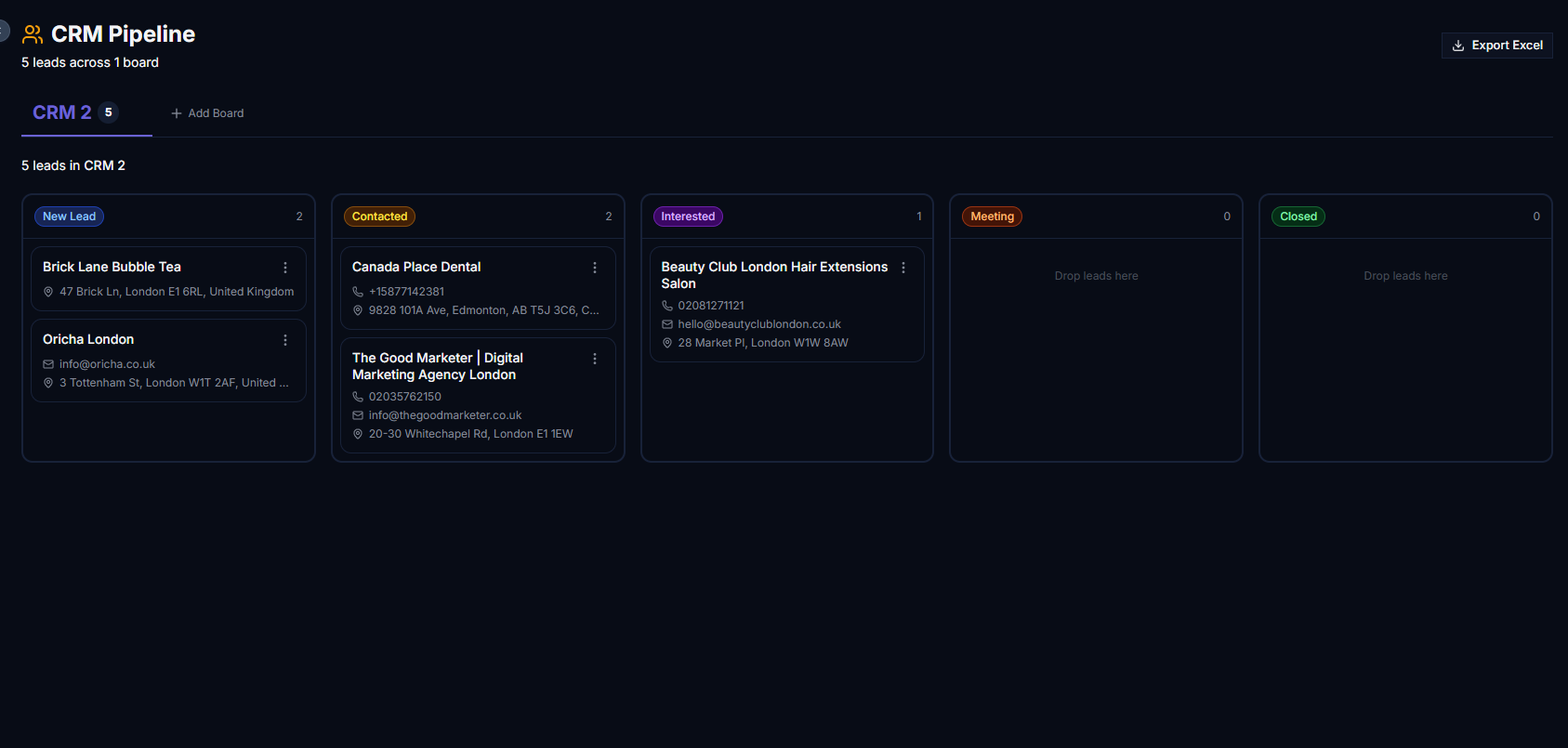
LeadBoba CRM's drag-and-drop pipeline for managing prospects
Finding business leads is only the beginning of a successful sales process.
After discovering potential customers, businesses need a simple way to organize prospects, track conversations, and move opportunities through the sales pipeline. Many sales teams still manage leads using spreadsheets, scattered notes, or disconnected tools. This creates problems:
- Lost prospects
- Poor follow-up management
- Difficult pipeline tracking
- No clear sales process
- Time wasted searching for lead information
LeadBoba CRM helps businesses organize discovered leads, manage sales pipelines, track opportunities, and keep all important prospect information in one place.
With LeadBoba CRM, users can search for businesses, save leads, move prospects into custom pipelines, and manage the entire lead journey from first discovery to closed opportunity.
What Is LeadBoba CRM?
LeadBoba CRM is a simple and flexible lead management system designed for businesses that need to organize their prospecting workflow. Instead of exporting leads into spreadsheets and manually tracking progress, users can manage prospects directly inside LeadBoba. LeadBoba CRM helps users:
- Store discovered leads
- Create custom pipelines
- Track lead status
- Manage sales opportunities
- View complete lead information
- Export CRM data as CSV
Whether you are a freelancer, marketing agency, sales team, or business owner, LeadBoba CRM helps you build an organized sales process.
How LeadBoba CRM Works
The LeadBoba CRM workflow is simple:
- 1Search for business leads
- 2Save or send leads directly to CRM
- 3Organize prospects in a pipeline
- 4Track conversations and opportunities
- 5Move leads through sales stages
- 6Export data when needed
Users do not need complicated CRM setup. LeadBoba combines lead discovery and lead management in one workflow.
Search for Business Leads
Before using CRM, users first discover potential customers through LeadBoba's lead search system. Users can search by:
- Business category
- Location
- Industry
For example: "dentists in London," "plumbers in Manchester," "restaurants in New York," or "marketing agencies in Sydney." LeadBoba collects business information including:
- Company name
- Category
- Address
- Phone number
- Email information
- Website
- Social media profiles
- Google rating
- Review count
Send Leads Directly to CRM or Save Them First
After finding leads, users have flexible options.
Option 1: Send Directly to CRM
Users can instantly move discovered leads into their CRM pipeline. This allows sales teams to immediately start organizing opportunities.
Option 2: Save Leads First
Users can also save leads and review them later. Saved leads are stored inside the Saved Leads page. From Saved Leads, users can:
- Review lead information
- Select multiple prospects
- Send leads to CRM when ready
This gives users more control before adding prospects to their sales pipeline. There is no need to worry about losing potential opportunities.
Create Multiple CRM Pipelines
Every business has different sales processes. LeadBoba allows users to create multiple CRM pipelines based on their workflow.
Sales Pipeline
Agency Client Pipeline
Different Business Segments
Users can create separate pipelines for:
- Different industries
- Different campaigns
- Different sales teams
- Different markets
Multiple CRM pipelines help businesses stay organized.
Manage Leads with a Simple Drag-and-Drop Pipeline
LeadBoba CRM uses an intuitive Kanban-style interface. Users can easily move leads between stages by dragging and dropping cards.
This makes it easy to understand the current status of every prospect. The simple visual layout helps sales teams quickly identify:
- New opportunities
- Follow-up requirements
- Active conversations
- Closed deals
A screenshot of the CRM kanban board fits well here
Mobile-Friendly CRM Experience
LeadBoba CRM is designed with a simple user experience. Users can manage their pipeline from mobile devices with an easy touch-based interface. The drag-and-drop workflow makes it simple to:
- Move leads between stages
- Review prospects
- Update statuses
- Manage sales opportunities
Sales professionals can update their pipeline anywhere.
View Complete Lead Information Inside CRM
Every lead inside the CRM pipeline can be opened to view detailed information. Users can check important prospect details including:
- Company name
- Business category
- Address
- Phone number
- Email information
- Website
- Social media profiles
- Google rating
- Review count
- Google Maps information
Sales teams do not need to search again for basic prospect information. Everything is available inside the lead record.
Export CRM Leads to CSV
LeadBoba allows users to export CRM data as CSV files. This makes it easy to:
- Backup lead information
- Analyze sales data
- Import leads into other systems
- Share prospect lists with teams
Exported data can include important business information collected during prospecting.
Why Use LeadBoba CRM Instead of Spreadsheets?
Many businesses start managing leads with spreadsheets. However, spreadsheets create problems:
- Difficult pipeline visualization
- Manual updates
- Missing follow-ups
- Poor collaboration
- Limited organization
LeadBoba CRM provides a dedicated system for managing prospects. Benefits include:
- Visual sales pipeline
- Organized lead records
- Multiple pipelines
- Faster updates
- Better sales tracking
Who Should Use LeadBoba CRM?
Manage potential clients from initial discovery to signed contracts.
Track prospects and improve follow-up processes.
Organize business opportunities without complicated CRM software.
Manage outbound prospecting campaigns.
Track potential customers and partnerships.
LeadBoba CRM Features
Key CRM features include:
Custom Pipelines
Create workflows that match your sales process.
Drag-and-Drop Management
Move prospects between stages easily.
Lead Details
Access complete business information from each prospect.
Multiple CRM Boards
Separate campaigns, industries, or sales processes.
CSV Export
Export lead information whenever needed.
Integrated Lead Discovery
Find and manage prospects in one platform.
Start Managing Your Business Leads with LeadBoba CRM
A successful sales process requires more than finding leads. Businesses need a simple way to organize prospects, track opportunities, and follow up consistently.
LeadBoba combines business lead generation with CRM management, allowing users to discover prospects, save leads, create pipelines, and manage sales opportunities from one platform.
Whether you are running an agency, sales team, SaaS business, or local service company, LeadBoba CRM helps you build a more organized lead management workflow.
Start managing your leads smarter today
Search prospects, save leads, build custom pipelines, and export data whenever you need it — all in one platform.
Leads Generator
Target businesses you won't find on LinkedInExtract leads from Google Maps, Apple Maps and Bing Maps
Restaurant in your area